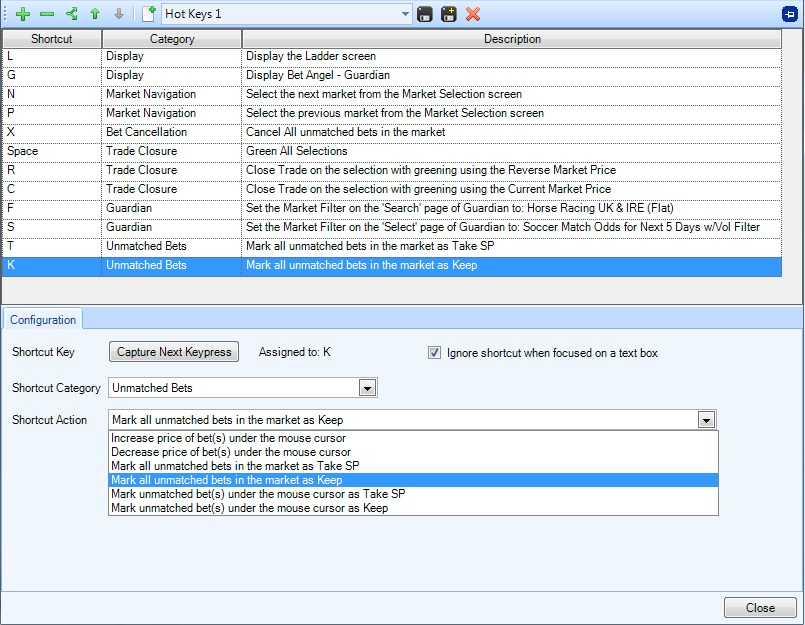
Bet Angel allows many of its features to be mapped to keyboard shortcuts, making it quicker and easier for you to navigate around the software and undertake specific tasks which you frequently do.
You can also apply several actions to the same shortcut key allowing you to do tasks such as selecting a specific market type from your guardian market list then applying a specific rules file to those selected markets - with a single key press.
Note: Shortcut actions assigned to the same keypress will be processed in the order they are displayed in the list of shortcuts (the order can be changed using the up and down green arrows in the toolbar).
Once you have created a shortcut key you can even have the keypress triggered automatically at your chosen time and frequency, for example if you have a shortcut key that selects today's UK horse racing markets and also add them to Guardian you could configure this key to be auto pressed at 11am each morning (using the Auto Keypress page)
The keyboard shortcut actions cover features such as: Bet Angel screen display, bet modification & cancellation, trade closure & greening, staking, ladder & one-click settings, layout & settings profile changes, Total Performance Data (TPD) plus more
To begin creating a shortcut key please see the next page of this user guide
Once you have one or more shortcut keys set up the following page of the user guide explains how you can configure the auto key pressing