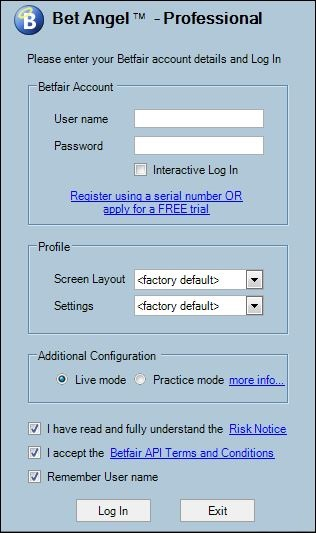
The Bet Angel Professional Log-in screen and options
You have already learned how to register your trial or purchased software so the log in is next.
Logging on to Betfair
Locate the Bet Angel icon on your Windows desktop or via the Windows start menu. Double click (desktop) or single click (Start Menu/Taskbar) this icon and Bet Angel will open. Enter your Betfair username. If you want Bet Angel to remember your username , tick ‘Remember User name’. Now enter your password into the Password text box; this is your Betfair password and is only known to you. For security reasons we do not know or store your Betfair password.
We will NEVER ask for your Betfair password. Never send it in an e-mail to anyone.
You should also tick the ‘I accept the Betfair API terms and conditions’ text. Your access to Betfair’s API is reliant on acceptance of these terms.
The 'Profile' section of the window can be left as <factory default>. There is an option to create custom Screen Layout and Settings profiles from within Bet Angel and you may wish to select them during log-in at a later date.
Live Mode / Practice Mode
To place real bets into the exchange you will need to choose Live mode.
By selecting practice mode when logging in, you will be able to use all the features of Bet Angel Professional without risk to your balance as any bets placed will be simulated locally and will not be sent to the exchange. For more information click here.
Betfair Account Region
If your Betfair account is registered in 'Romania', 'Sweden' or 'New Zealand' you will need to select the region appropriate to you, for accounts registered in any other country including the UK you would leave this as 'International'
Filter Bets with Strategy Reference
Using a strategy reference will separate activity (including Profit & Loss) in this instance of Bet Angel from another using a different reference. All bets placed via this instance will have the strategy reference applied. For more information please see the next page
Logging in
Once you have completed your user name, entered your password and set other log in features (some optional) all but your passwords will be remembered by Bet Angel. When you are ready to start click the ‘Log in’ button.
The Betfair API will show a splash screen when you first use Bet Angel Professional. This will explain that it is the "first time you have accessed the new Betfair API" a progress bar will appear. This is normal, please allow 2-3 minutes for permission to be granted.
The contents of The Bet Angel Professional Log-in screen and options